Solution Overview
Ignition.Sc Project
Components Folder Structure
Creating the Models Interface to Map to a Sitecore Template
Creating the ViewModel for a Component
Creating a Custom ViewModel
Re-Using the ViewModel
For most situations when the view path for a component is specified in code, it is either implied by its folder location coinciding with its controller call or directly referenced in the view model used by the view. However, it is sometimes preferable to make a view model as re-useable as possible by multiple Sitecore component views in MVC using the ignition framework. The view path can be set dynamically through an agent as part of the controller call so that a view model can be used by multiple separate views representing different Sitecore components.
Does that mean that a re-used view model requires the agent to change the view path as part of the controller action result? No, as long as (a) the folder containing the controller file matches the controller cs file appendix and (b) the action result method names match the name of the views. Then the View method call would just accept the view model and the file names and folder structure associated with the controller and views would take it from there. As an example, what is shown below are three different controller/view calls which use the same view model ContentBlurbViewModel. Note that each View call is using the same agent (ContentBlurbAgent) to help populate the ContentBlurbViewModel but each view call can use a different agent if the process used to populate that view model has to be distinct for each view call.
public ActionResult ContentBlurbView()
{
    return View<ContentBlurbAgent, ContentBlurbViewModel>();
}

public ActionResult ContentBlurbViewTwo()
{
    return View<ContentBlurbAgent, ContentBlurbViewModel>();
}

public ActionResult ContentBlurbViewThree()
{
    return View<ContentBlurbAgent, ContentBlurbViewModel>();
}
In each case, the view path is not set dynamically in code because the view file name exactly matches the action result controller call and can be found in the root of the Content folder which also contains the ContentController cs file as shown below in the folder structure image. So in this sense, the structure directly supports how the views can be accessed without requiring additional code.
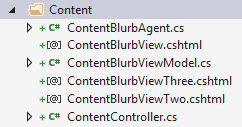
However, if there is a need to structure the location of the view files in a different way or if the view name happens not to match the name of the action result in the controller calling it, then setting the view path dynamically in code so the view model can be re-used does become necessary. The rest of the discussion of this blog will involve a situation where we are not assuming the view names or file locations and the action results which reference them actually match.
View File Path Referenced through its Agent
The view path associated with a controller call used in the Ignition framework can be set dynamically by the developer. This would allow the same view model to be used by many different views using variations of the View method call regardless of the folder structure of the Ignition framework implementation. An example of this call is shown below.
public ActionResult HeroSelector()
{

    return View<HeroSelectorAgent, HeroSelectorViewModel>();

}
If a developer plans to re-use a view model and vary the view path, it will become necessary to create a view agent (please note the HeroSelectorAgent reference in the above example). The agent is necessary because the view file path must be set which we will use the agent to perform. Setting the view path on some level should be handled by the agent. This agent must contains a PopulateMethod method which handles any logic which aids in populating the view model used for the view including where to find the view. An example of the code used within the Populate method to set the view path is shown below. The IgnitionConstants.Hero.HeroSelectorView constant references the view path. It is encouraged to have constants defined in a constants cs file like IgnitionConstants.cs and then referenced in those files which needs access to those constants as shown.
public override void PopulateModel()
{
    ViewModel.ViewPath = IgnitionConstants.Hero.HeroSelectorView;
}
That is it. With what you read you can now re-use view models with different views effectively as a part of developing re-usable content in Sitecore during component development.
Creating the View for a Component
Ensuring the View Supports the Experience Editor
Creating an Experience Editor View
Creating an Agent for a Component
Implementing PopulateModel
Accessing the Component’s Datasource
Setting up and Accessing Rendering Parameters
Creating the Rendering Parameter Template
Coding the Rendering Parameters Interface
Accessing the Rendering Parameter in Code
Accessing the Agent Parameters
Performing Searches Against Sitecore Items in Code
Other uses for Constants.cs
The Ignition framework has as a standard for using a constants file as opposed to having constants randomly assigned to variables throughout the application. When a new Ignition project is created, an IgnitionConstants.cs file is added to the Ignition.Sc project within the Presentation folder of the Ignition solution.
Example of the type of constants oriented information which can be stored in the IgnitionConstants.cs file include
- Placeholder Names
- Folder Names
- Item Names
- Tag Names
- Item GUIDs (when needed)
- View Paths (when needed)
This is not an exhaustive list of string options for constants but keeping these constants in one file makes it easier to re-use and to update this information through-out the application when necessary.
Code Structure of IgnitionConstants.cs File
The code structure used to define these constants appear like the following…
namespace Ignition.Sc
{
    public struct IgnitionConstants
    {
        public struct Placeholders
        {
            public struct Layout
            {
                public const string LayoutContent = "layoutContent";
                public const string LayoutHead = "layoutHead";
            }

            public struct Content
            {
                public const string BlurbList = "blurb";
            }
        }

        public struct News
        {
            public const string NewsDetailBranchId = "{4713D2A4-6E63-4FDB-B463-6C6DA154725E}";
            public const string InTheNewsDetailBranchId = "{4CB843CE-3868-4CAE-B86F-DBDA7217E4A4}";
            public const string InTheNewsTypeTag = "InTheNews";
        }

        public struct CardTagType
        {
            public const string ContentType = "Content";
            public const string TaxonomyTag = "Tag";
        }
    }
}
Within the IgnitionConstants class, a bunch of C# structs are used to define the level of constants needed to support the application. An example of this reference is shown below.
using Ignition.Core.Mvc;

namespace Ignition.Sc.Components.Content
{
    public class ContentBlurbListViewAgent : Agent<ContentBlurbListViewModel>
    {
        public override void PopulateModel()
        {
            ViewModel.CurrentTag = IgnitionConstants.CardTagType.ContentType;
        }
    }
}
In this example, the current tag property of the view model is set by pulling a constant from the IgnitionConstants.cs file used to manage those constants where this value is defined.